How to Scrape Google Shopping Results for Price Monitoring
Learn how to scrape Google Shopping results for price monitoring, competitor tracking, and ecommerce intelligence with a SERP API.
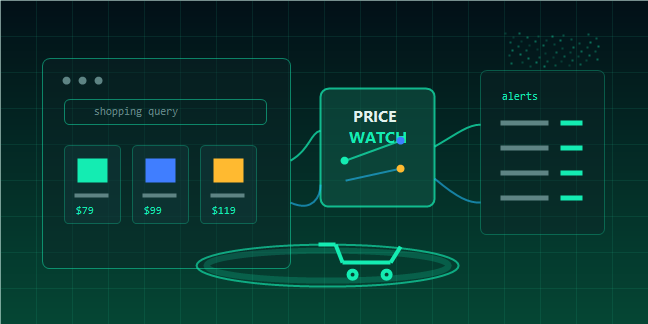



Google Shopping results are one of the most useful data sources for ecommerce teams. They show product prices, sellers, ratings, availability signals, and how competing products appear for commercial search queries.
For price monitoring, this data can help you understand whether your products are priced competitively, which sellers dominate a keyword, and how prices change over time. Instead of building fragile scrapers, developers can use TalorData SERP API to retrieve structured search result data for ecommerce workflows.
Why Google Shopping Data Matters
Price is only one part of ecommerce visibility. Google Shopping results also show how products are positioned, how sellers compete, and what users see before they click.
Price Monitoring
Brands and retailers need to know when competitors lower prices, when marketplaces show aggressive offers, or when a product becomes overpriced compared with similar listings.
Competitor Tracking
Google Shopping results reveal which brands, sellers, and marketplaces appear for high-intent keywords. This helps ecommerce teams identify direct competitors and watch changes in visibility.
Market Intelligence
Shopping data can support category analysis, product launch research, promotional tracking, and pricing strategy. It gives teams a live view of what searchers see in the market.
What Data Can You Extract from Google Shopping Results?
The exact fields depend on the search result type and API response, but ecommerce teams usually care about the following information.
Product-Level Fields
· Product title
· Price
· Seller or merchant
· Product link
· Thumbnail image
· Rating and review count
· Delivery or shipping information
· Position in the results
Search Context Fields
· Search query
· Search engine
· Country or city
· Language
· Device type
· Timestamp
These fields are important because price monitoring only becomes useful when you know where and when the result appeared.
Why Use a SERP API Instead of a Custom Scraper?
Google Shopping pages are dynamic, location-sensitive, and difficult to parse reliably. A scraper that works today may break when the layout changes.
Less Maintenance
With a SERP API, your team does not need to constantly update selectors, manage browser automation, or repair parsing logic after page changes.
Structured Output
APIs return structured data that can be stored directly in databases, dashboards, or analytics pipelines.
Geo-Targeted Results
Shopping prices and sellers can vary by location. A SERP API can help retrieve results for different countries, cities, and languages.
How to Build a Price Monitoring Workflow
Step 1: Define Your Product Keywords
Start with a list of product and category keywords. For example:
· wireless noise cancelling headphones
· running shoes for men
· portable espresso maker
· gaming laptop under 1000
Use both brand keywords and generic category keywords. Brand keywords help track your own products, while category keywords reveal the broader competitive landscape.
Step 2: Choose Locations and Languages
Prices and sellers may differ by market. If you sell in the United States, Canada, the United Kingdom, and Australia, monitor each market separately.
You can review TalorData's API query parameters to configure query, search engine, location, language, and result options.
Step 3: Retrieve Shopping Results
A typical request sends a query and targeting options to the SERP API, then receives structured results.
const query = "wireless noise cancelling headphones";
const response = await fetch("YOUR_TALORDATA_SERP_API_ENDPOINT", {
method: "POST",
headers: {
"Authorization": "Bearer YOUR_API_KEY",
"Content-Type": "application/json"
},
body: JSON.stringify({
q: query,
engine: "google",
type: "shopping",
location: "United States",
language: "en"
})
});
const data = await response.json();
Always check the official documentation for the latest endpoint and parameter names.
Step 4: Normalize Prices
Before comparing prices, normalize currency, remove formatting, and store numeric values. This makes it possible to calculate average price, lowest price, price changes, and outliers.
function parsePrice(value) {
if (!value) return null;
return Number(String(value).replace(/[^0-9.]/g, ""));
}
Step 5: Store Daily Snapshots
Price monitoring becomes powerful when you track changes over time. Store the query, product title, seller, price, position, location, and timestamp for each result.
Example Price Monitoring Metrics
Lowest Listed Price
Track the lowest price for each keyword or product group. This helps identify aggressive competitors and marketplace promotions.
Average Price by Keyword
Average price helps you understand the overall market level for a product category.
Seller Visibility
Count how often each seller appears in top positions. A seller with consistent visibility may be winning both pricing and ranking.
Price Change Alerts
Trigger alerts when a competitor drops price by more than a threshold, such as 5% or 10%.
Use Cases for Ecommerce Teams
Competitive Pricing
Retailers can compare their prices with visible competitors and adjust promotions when needed.
Marketplace Monitoring
Brands can monitor whether unauthorized sellers appear in Shopping results or whether marketplaces undercut official pricing.
Product Launch Research
Before launching a product, teams can analyze price ranges, common sellers, and competing product titles for target keywords.
AI-Powered Ecommerce Agents
AI agents can use shopping data to generate daily pricing reports, detect anomalies, or summarize competitor movement for merchandising teams.
Best Practices
Monitor the Same Query Consistently
Use consistent queries, locations, and languages so your data is comparable over time.
Separate Brand and Category Keywords
Brand keywords show your direct visibility. Category keywords show the wider market.
Keep Raw and Normalized Data
Store the original API response and a cleaned version. Raw data helps with debugging, while normalized data is easier for analysis.
Watch Position and Price Together
The lowest price is not always the most visible result. Track both price and position to understand true competitive exposure.
Why Use TalorData SERP API
TalorData SERP API helps ecommerce and analytics teams retrieve real-time SERP data
without maintaining scraping infrastructure.
With TalorData, you can:
· Access real-time search result data
· Retrieve JSON or HTML responses
· Use geo-targeted SERP data
· Support ecommerce, SEO, AI, and market intelligence workflows
· Start with 1,000 free responses
· Scale with response-based pricing on the pricing page
FAQ
Can I scrape Google Shopping results?
You can build your own scraper, but Google Shopping pages can be dynamic and difficult to maintain. A SERP API is usually more reliable for production workflows.
What is Google Shopping price monitoring?
It is the process of tracking product prices, sellers, and product visibility in Google Shopping results over time.
Can a SERP API help with competitor pricing?
Yes. A SERP API can return structured search result data that helps you compare competitor prices, sellers, and positions.
Is Google Shopping data useful for AI agents?
Yes. AI agents can use shopping data to summarize pricing changes, detect anomalies, and generate ecommerce intelligence reports.
Conclusion
Google Shopping results are a valuable data source for ecommerce price monitoring, competitor tracking, and market intelligence. The challenge is collecting the data reliably and turning it into structured signals.
With TalorData SERP API, teams can retrieve real-time SERP data, build price monitoring workflows, and scale ecommerce intelligence without maintaining custom scraping infrastructure.